Basics
P25 radios are public-safety grade, usually with a 16-position channel knob and multiple zones. The MVP25 band plan is name-based, so where you put channels in your radio is up to you. The templates below use the A/B/C switch to select banks; MVP25 programmers use them when helping users.
In channel names, # marks a digital P25 channel. MVL means MV Link (system-wide) and STE means Site (repeater-isolated).
Talkgroups and selective squelch
The system uses talkgroups to organize traffic into "channels". You must use selective squelch and the correct talkgroup. If you don't use a talkgroup, properly programmed radios won't hear you and your transmissions cause interference. Without selective squelch, you'll hear every transmission on the network, including those not meant for your talkgroup, which causes confusion and harmful interference on the single talk path. Only the approved talkgroups listed on the Repeaters page may be used.
Most programming software doesn't default to it. If you don't change it, your radio won't filter on talkgroup, which the network requires.
| Programming software | Radio | Setting | Choose |
|---|---|---|---|
| EF Johnson PC Configure | EF Johnson 5100es | Receive portion: uncheck digital squelch | Selective |
| Radio Personality Manager | Harris, all models | Sq Mode | SEL |
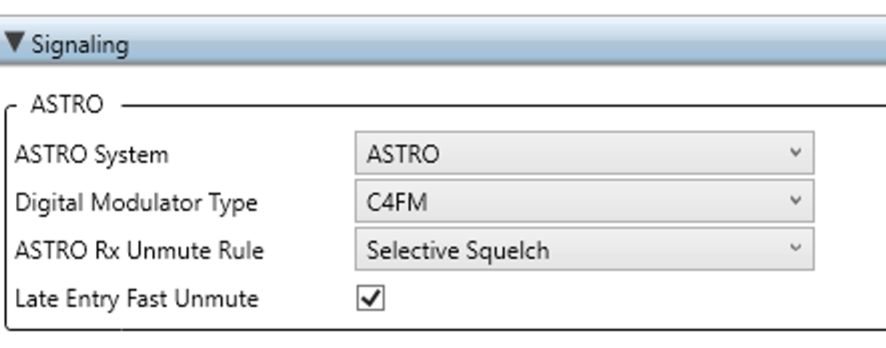
| Astro Saber and XTS 3000 CPS | Motorola XTS 3000 | Rx Unmute Rule | Selective Squelch |
| ASTRO 25 Portable CPS | Motorola XTS 2500, XTS 5000 | Rx Unmute Rule | Selective Squelch |
| APX CPS | Motorola APX, any model | Rx Unmute Rule | Selective Squelch |
| ASTRO Spectra | Motorola Astro Spectra | Rx Unmute Rule | Selective Squelch |
| ASTRO 25 Mobile CPS | Motorola XTL 2500, XTL 5000 | Rx Unmute Rule | Selective Squelch |
One talk path
There are a handful of talkgroups and individual (user-to-user) calls in use, but there is only one talk path across the wide-area network. P25 filtering works much like the filtering in other digital modes (DMR, D-Star) and analog (CTCSS, DPL). If you hear a conversation on one talkgroup and switch to another, the talk path isn't necessarily free. Most traffic is short, so in practice multiple talkgroups rarely interfere.
Strapped talkgroups are required. A strapped talkgroup can't be changed from the front panel. There may be traffic on the talk path for other talkgroups; listening to it only causes confusion, because you can't change talkgroup and NAC to reply. Since Version 2 filters on both talkgroup and NAC, front-panel talkgroup select is no longer supported. Program each talkgroup and NAC as its own channel and use scan to monitor.
Recommended templates
Most users spend their time on the wide-area MV Link talkgroup or the UCOM1 simplex channel. With Version 3 roaming in both the repeaters and the radio, a working install can be just two channels.
Channel and zone names
Use these names so radios are consistent and easy to support.
| Channel | 8-character name | 12/14-character name |
|---|---|---|
| UCOM 1 simplex (P25) | #UCOM1 | UCOM1 |
| MV Link, Version 3 | MVLink 3 | MV Link v3 |
| Individual call (user-to-user) | I-Call | I-Call |
| Site local | STE xxx | STE xxx ABC |
| UTac simplex, P25 | #UTACxP | #UTACx P25 |
| UTac simplex, analog | UTAC1 | UTAC1 |
| MV Link to one repeater | MVL 3.x | MV Link v3.x |
| I-Call on one repeater | ICALL3.X | I-Call v3.x |
| Zone | 2/3 characters | 8 characters | 12/14 characters |
|---|---|---|---|
| MVP25 system | MV | MVP25 | MVP25 |
| FPP | FP | FPP | FPP |
| Repeaters | RP | RPTS | REPEATERS |
Basic install
MV Link v3 and #UCOM1: the two channels most users need.
| Channel | Zone | Name |
|---|---|---|
| 1 | MVP25 | UCOM1 |
| 2 | MVP25 | MV Link v3 |
Full install
MV Link v3, #UCOM1 simplex, I-Call, and the five UTac channels entered twice, in P25 and FM. This gives you spare channels and simple simplex compatibility with non-P25 users. Program the UTac P25 channels for mixed-mode receive so you'll hear if a channel is in use in analog. Frequencies are on the Repeaters page.
| Channel | MVP25 full install |
|---|---|
| 1 | MVP25 UCOM1 |
| 2 | MVP25 MV Link v3 |
| 3 | MVP25 I-Call |
| 4 | Open |
| 5 | Open |
| 6 | Open |
| 7 | UTAC 1 FM |
| 8 | UTAC 2 FM |
| 9 | UTAC 3 FM |
| 10 | UTAC 4 FM |
| 11 | UTAC 5 FM |
| 12 | #UTAC1 P25 |
| 13 | #UTAC2 P25 |
| 14 | #UTAC3 P25 |
| 15 | #UTAC4 P25 |
| 16 | #UTAC5 P25 |
Vote scan settings (Version 3 roaming)
Vote scan makes your radio monitor all MVP25 repeaters and automatically pick the best one, so a single MV Link channel works anywhere in coverage.
| Setting | Value | Why |
|---|---|---|
| Vote scan | Enabled | |
| Transmit steering | Enabled, if your radio has it | Without TX steering, transmit on the input of channel 2, 291 Xenia: 449.0125. It's roughly central to all MVP25 receivers and works well on every site. |
| Scan list order | Start with channel 2, 291 Xenia (449.0125) | Moved to channel 2 in Version 3.1 to help avoid repeater coordination conflicts. |
| Voting threshold | −70 RSSI | The radio keeps looking for a better repeater while the signal is worse than −70. |
| RSSI delay time | 0 ms | How long the radio waits before looking for a better signal. Set to 0 in Version 3.1, because with weak signals any extra delay was noticeable. |
| Show strongest voted channel | Optional | Shows the voted channel on the display. Interesting, but doesn't affect operation. |
Radio examples
We can't show every radio, but here are vote scan examples for the most common ones on the MV Link talkgroup.
Motorola APX (any model)
From the MVP25 APX portable vote scan personality notes. Set up one conventional personality, MV Link V3, with these options.
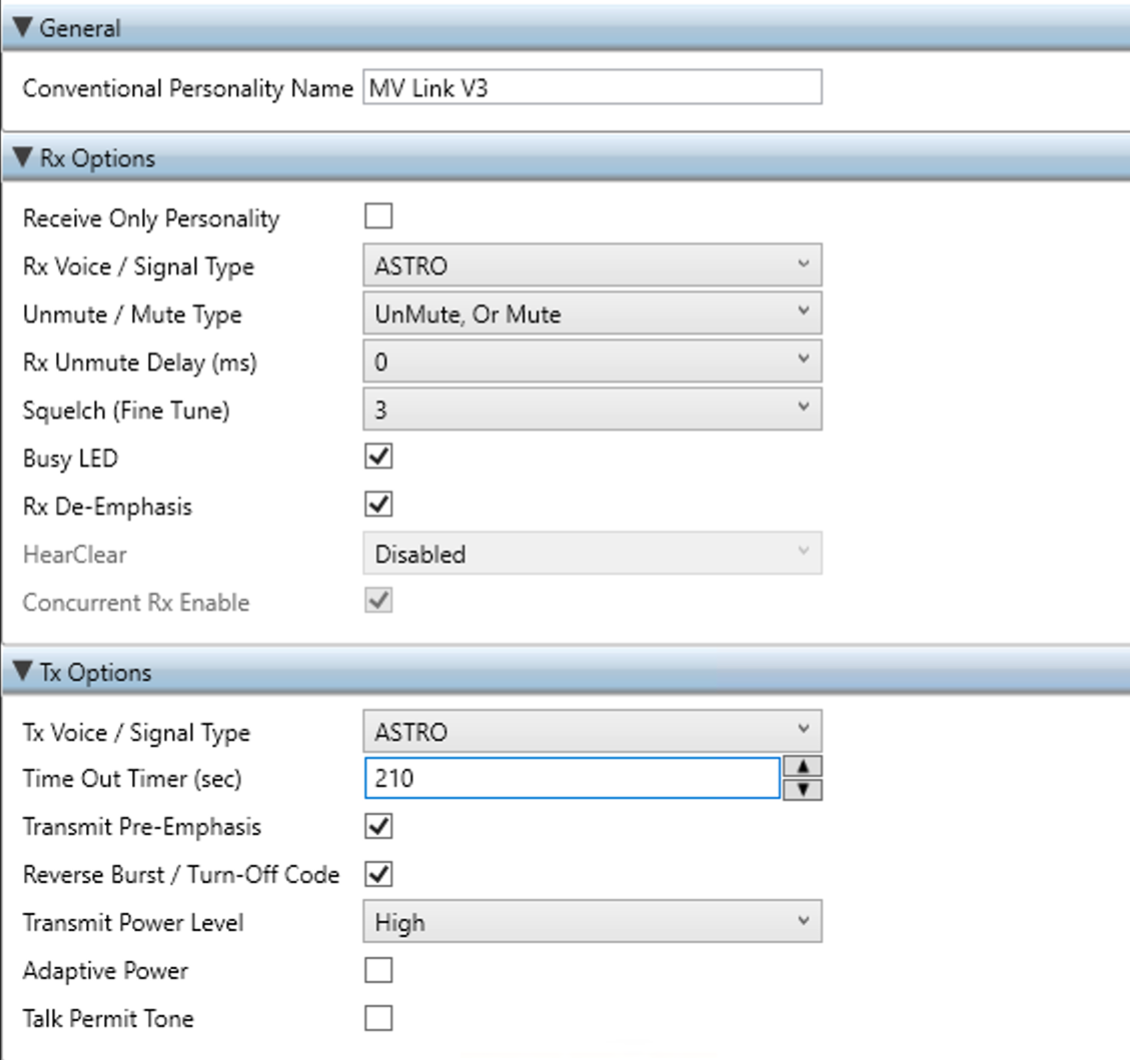
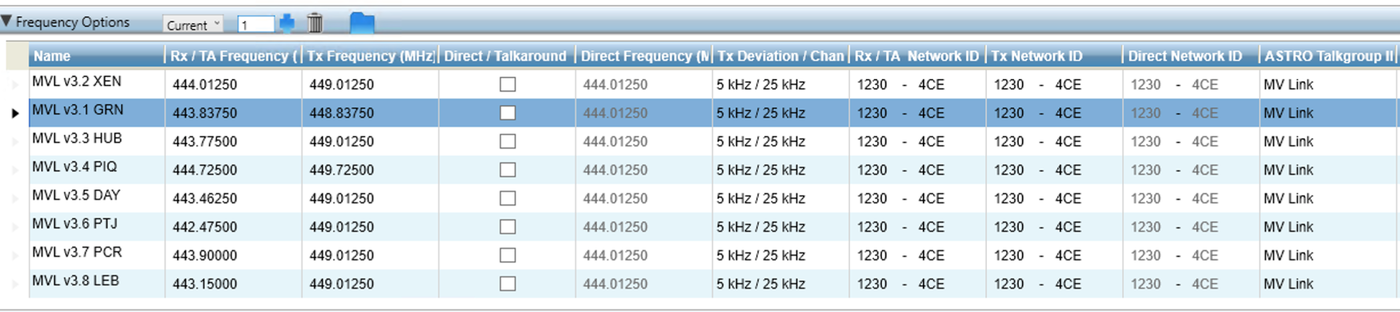
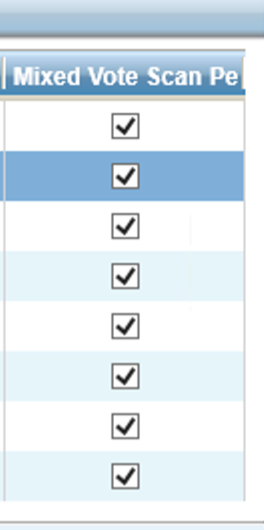
In the frequency options grid, scroll to the far right and check Mixed Vote Scan Persistent Member on every row.
Enable selective squelch
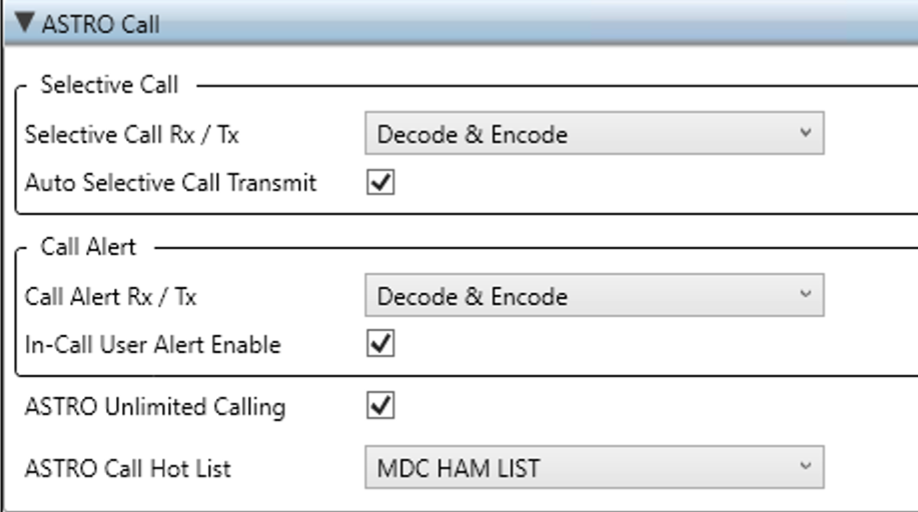
Enable call and alert options
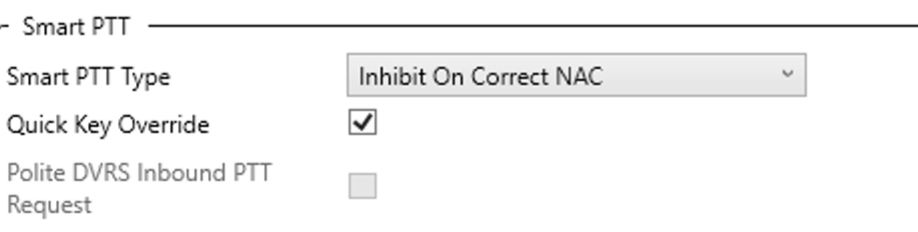
Smart PTT: inhibit on correct NAC
This makes you less likely to key over someone else.
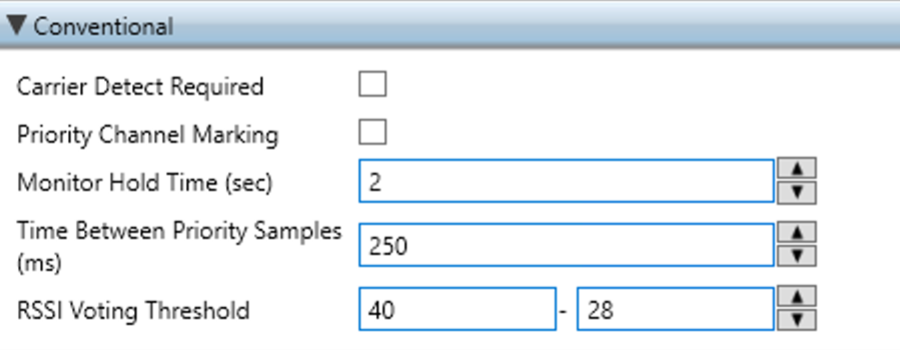
Scan configuration: scan wide, conventional
Set the RSSI voting threshold to 40 – 28.
Motorola Astro XTS 5000
On these radios, vote scan is set in the channel personality; no special scan list is needed.
- ASTRO talkgroup options: Talkgroup checked; selection type Strapped; talkgroup 9371 (Miami Valley Link).
- Scan: your standard scan list; automatic scan optional; Mixed vote scan enable checked; Tx steering checked.
- ASTRO: digital modulation type C4FM; Rx unmute rule Selective Squelch.
Frequency options, starting with channel 2:
| Ch | Option name | Rx frequency | Tx frequency | Mixed vote scan persistent member |
|---|---|---|---|---|
| 2 | MV Link v3.2 | 444.0125 | 449.0125 | Checked |
| 1 | MV Link v3.1 | 443.8375 | 448.8375 | Checked |
| 3 | MV Link v3.3 | 443.7750 | 448.7750 | Checked |
| 4 | MV Link v3.4 | 444.7250 | 449.7250 | Checked |
| 5 | MV Link v3.5 | 443.4625 | 448.4625 | Checked |
| 6 | MV Link v3.6 | 442.4750 | 447.4750 | Checked |
| 7 | MV Link v3.7 | 443.9000 | 448.9000 | Checked |
| 8 | MV Link v3.8 | 443.1500 | 448.1500 | Checked |
Motorola Astro Spectra / XTS 3000
On these radios, vote scan is set up through a scan list.
- Create a new scan list: scan type Voting Scan; designated voice TX member Talkback.
- Enter each repeater channel as a personality with the standard system settings.
- On the scan tab, select the voting scan list and turn on automatic scan.
- Vote scan members must be in a zone. Hide the "unused" members by placing them above channel 16.
| Ch | Name | Notes |
|---|---|---|
| 1 | MV #UCOM 1 | |
| 2 | MV # Link v3 | Put the default starting point, channel 2 (291 Xenia), here. This radio doesn't support transmit steering, so all MV Link transmissions are on this frequency. |
| 3 | MV OPEN | Individual call (talkgroup 0) isn't supported on this radio. |
| 4 | MV STE311GRN | Greenhills site local |
| 5 | MV STE291XEN | Xenia site local |
| 6 | MV STE551HUB | Huber site local |
| 7 | MV STE552PIQ | Piqua site local |
| 8 | MV STE571DAY | Dayton site local |
| 9 | MV STE751PTJ | Port Jefferson site local |
| 10 | MV STE752PCR | Plum Creek site local |
| 11 | MV STE831LEB | Lebanon site local |
| 12 | MV #UTAC 1 | UTAC 1, P25 |
| 13 | MV #UTAC 2 | UTAC 2, P25 |
| 14 | MV #UTAC 3 | UTAC 3, P25 |
| 15 | MV #UTAC 4 | UTAC 4, P25 |
| 16 | MV #UTAC 5 | UTAC 5, P25 |
| 17 | MV # Link v3 | MV Link channel 1 (vote scan member, hidden above 16) |
| 18 | MV # Link v3 | MV Link channel 3 |
| 19 | MV # Link v3 | MV Link channel 4 |
| 20 | MV # Link v3 | MV Link channel 5 |
| 21 | MV # Link v3 | MV Link channel 6 |
| 22 | MV # Link v3 | MV Link channel 7 |
| 23 | MV # Link v3 | MV Link channel 8 |
Harris XG-100
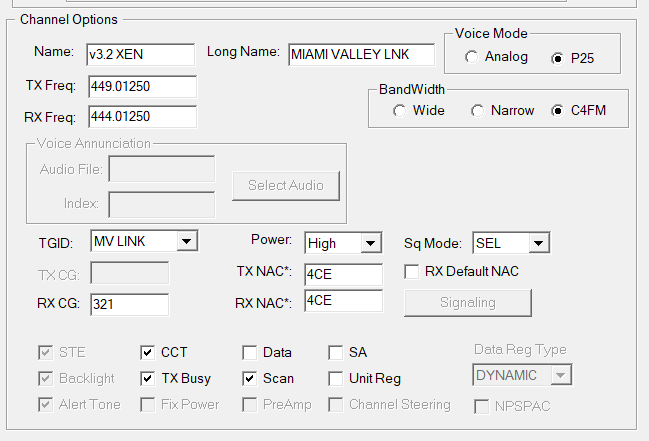
Vote scan is set in a P25 conventional frequency set. Select your P25 group set, check Vote Scan, set Voting Threshold 70 and RSSI Delay Time 0; showing the strongest voted channel is optional. Program each channel the same way, and make the first channel channel 2 (Xenia).
Channel tables
$ means hexadecimal. A + after a frequency means a positive 5 MHz offset (the repeater input is 5 MHz higher).
Miami Valley Link
| Ch | Name | Frequency | Rx NAC | Tx NAC | Talkgroup |
|---|---|---|---|---|---|
| 1 | MVL #UCOM1 | 440.9625 | $4CE | $4CE | 8900 |
| 2 | MVL #311 Greenhills | 443.8375+ | $4CE | $4CE | 9371 |
| 3 | MVL #291 Xenia | 444.0125+ | $4CE | $4CE | 9371 |
| 4 | MVL #551 Huber | 443.7750+ | $4CE | $4CE | 9371 |
| 5 | MVL #552 Piqua | 444.7250+ | $4CE | $4CE | 9371 |
| 6 | MVL #571 Dayton | 443.4625+ | $4CE | $4CE | 9371 |
| 7 | MVL #751 Port Jefferson | 442.4750+ | $4CE | $4CE | 9371 |
| 8 | MVL #752 Plum Creek | 443.9000+ | $4CE | $4CE | 9371 |
| 9 | MVL #831 Lebanon | 443.1500+ | $4CE | $4CE | 9371 |
| 10 | MVL Open | — | — | — | — |
| 11 | MVL 70 CALL | 446.0000 | — | — | — |
| 12 | MVL #UTac1P | 446.0250 | $4CE | $4CE | 8900 |
| 13 | MVL #UTac2P | 446.0500 | $4CE | $4CE | 8900 |
| 14 | MVL #UTac3P | 446.0750 | $4CE | $4CE | 8900 |
| 15 | MVL #UTac4P | 446.1000 | $4CE | $4CE | 8900 |
| 16 | MVL #UTac5P | 446.1250 | $4CE | $4CE | 8900 |
Site local
Site-local channels stay on one repeater and aren't sent over the network. They share the talk path with MV Link but are separate; MV Link and site-local channels won't talk to each other, even on the same repeater.
| Ch | Name | Frequency | Rx NAC / PL | Tx NAC / PL | Talkgroup |
|---|---|---|---|---|---|
| 1 | STE #UCOM1 | 440.9625 | $4CE | $4CE | 8900 |
| 2 | STE #311 Greenhills | 443.8375+ | $311 | $311 | 9001 |
| 3 | STE #291 Xenia | 444.0125+ | $291 | $291 | 9001 |
| 4 | STE #551 Huber | 443.7750+ | $551 | $551 | 9001 |
| 5 | STE #552 Piqua | 444.7250+ | $552 | $552 | 9001 |
| 6 | STE #571 Dayton | 443.4625+ | $571 | $571 | 9001 |
| 7 | STE #751 Port Jefferson | 442.4750+ | $751 | $751 | 9001 |
| 8 | STE #752 Plum Creek | 443.9000+ | $752 | $752 | 9001 |
| 9 | STE #831 Lebanon | 443.1500+ | $831 | $831 | 9001 |
| 10 | STE Open | — | — | — | — |
| 11 | STE 70 CALL | 446.0000 | — | — | — |
| 12 | STE UTac1 | 446.0250 | 118.8 | 118.8 | — (analog) |
| 13 | STE UTac2 | 446.0500 | 118.8 | 118.8 | — (analog) |
| 14 | STE UTac3 | 446.0750 | 118.8 | 118.8 | — (analog) |
| 15 | STE UTac4 | 446.1000 | 118.8 | 118.8 | — (analog) |
| 16 | STE UTac5 | 446.1250 | 118.8 | 118.8 | — (analog) |
Advanced install (Version 2 compatible)
This setup puts your radio on one specific repeater for MV Link. It isn't the recommended mode, and it's for radios that don't support vote scan. Choosing one repeater only steers what your radio listens to; the repeaters still scan and listen to every input, so it doesn't change how your transmission is picked up.
It also includes the site-local channels. They're kept on every repeater, but they aren't part of the recommended install: they've never been popular and have confused many users.
| Ch | Bank A: MV Link, UTac P25 | Bank B: Site local, UTac FM | Bank C: UCOM1 |
|---|---|---|---|
| 1 | #UCOM1 | #UCOM1 | #UCOM1 |
| 2 | MVL #311 Greenhills | STE #311 Greenhills | #UCOM1 |
| 3 | MVL #291 Xenia | STE #291 Xenia | #UCOM1 |
| 4 | MVL #551 Huber | STE #551 Huber | #UCOM1 |
| 5 | MVL #552 Piqua | STE #552 Piqua | #UCOM1 |
| 6 | MVL #571 Dayton | STE #571 Dayton | #UCOM1 |
| 7 | MVL #751 Port Jefferson | STE #751 Port Jefferson | #UCOM1 |
| 8 | MVL #752 Plum Creek | STE #752 Plum Creek | #UCOM1 |
| 9 | MVL #831 Lebanon | STE #831 Lebanon | #UCOM1 |
| 10 | MVL Open | STE Open | #UCOM1 |
| 11 | MVL 70 CALL (446.0) | STE 70 CALL (446.0) | #UCOM1 |
| 12 | #UTac1P (P25) | UTac1 (analog) | #UCOM1 |
| 13 | #UTac2P (P25) | UTac2 (analog) | #UCOM1 |
| 14 | #UTac3P (P25) | UTac3 (analog) | #UCOM1 |
| 15 | #UTac4P (P25) | UTac4 (analog) | #UCOM1 |
| 16 | #UTac5P (P25) | UTac5 (analog) | #UCOM1 |
Downloads
The original documents, for printing or offline use: